

You sell on Shopify, maybe on Amazon too, and your accountant has just asked which software the books should live in. Xero or QuickBooks? Every forum thread gives a different answer, and most of them skip the one problem that really hurts online sellers: matching messy marketplace payouts to the bank.
This guide covers Xero vs QuickBooks for e-commerce sellers on the points that matter day to day. User limits, multi channel payouts, inventory, currencies, sales tax and cost. We'll also say plainly when each tool is the wrong pick. If you'd rather hand the whole job to a team, our outsource ecommerce accounting services page explains how that works.
Xero vs QuickBooks for E-Commerce Sellers at a Glance
Xero and QuickBooks Online are the two main cloud accounting choices for online retailers. Xero includes unlimited users on every plan and suits international teams. QuickBooks Online caps users by plan but offers deeper US reporting, class tracking and wider CPA adoption. Both need a connector such as Link My Books or A2X to post marketplace sales cleanly.
Here's the short version before we get into detail. This QuickBooks vs Xero table shows where the two platforms actually differ for a store doing a few hundred orders a month.
| Feature | Xero | QuickBooks Online | What It Means for Sellers |
|---|---|---|---|
| Users | Unlimited on all plans | 1 to 25, set by plan | Xero is cheaper for growing teams |
| Multi currency | Top plan only | Plus plan and above | Needed for overseas payouts |
| Inventory | Basic tracked stock, average cost | Plus plan and above, FIFO cost | Both need an add on for multiple warehouses |
| Marketplace connectors | Link My Books, A2X, Synder | Link My Books, A2X, Synder, native app | Summarised posting keeps the ledger clean |
| Accountant adoption | Strongest in UK, Australia and New Zealand | Strongest in the US and Canada | Your accountant often decides |
| Pricing model | Flat plans, no per user fee | Tiered plans with user caps | Compare Xero top plan with QuickBooks Plus |
Neither product is built for e-commerce out of the box. That surprises people. Both are general ledgers, and the quality of your online store accounting depends far more on how you connect sales channels than on the logo in the corner.
How Do Xero and QuickBooks Handle Multi Channel Sales and Payouts?
Neither platform should receive every individual order. Shopify, Amazon and eBay create thousands of small transactions, so the clean method is to post one summarised journal per payout, covering gross sales, fees and refunds, then match it to the single bank deposit. Both Xero and QuickBooks Online support this through connector apps.
Amazon pays in settlements, roughly every two weeks, with referral fees, FBA fees and refunds already netted off. Shopify Payments pays out daily, minus processing fees. Push every order straight into the ledger and your bank feed shows one deposit while the books hold 160 invoices. Nobody can match that by hand without losing a weekend.
Xero's reconciliation screen is quick at pairing one summarised line with one deposit, and its bank rules save a lot of clicking. QuickBooks Online gives you more control over clearing accounts, classes and locations, which helps if you want to see margin by channel. My honest view: Xero feels faster, QuickBooks feels deeper. Neither is wrong.
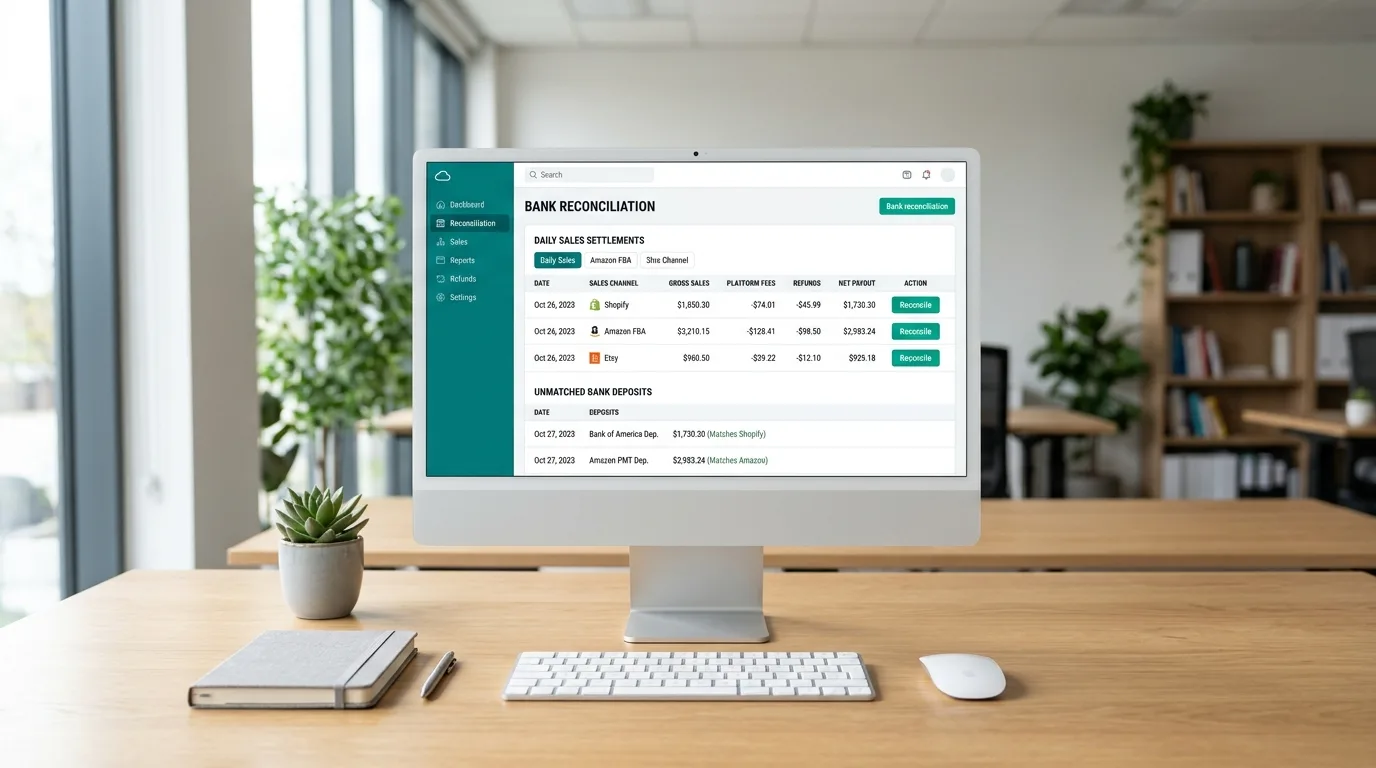
Whichever tool you pick, build three accounts for every channel: a sales clearing account, a fees account and a refunds account. The clearing account should land on zero after each payout. If it doesn't, something was missed, and you'll see it within days instead of at year end. That one habit is the backbone of good ecommerce bookkeeping. At Cred Books, this is the first structure we build for a new online seller, and our outsource Xero accounting services team sets it up inside Xero every week.
Which Apps Connect Shopify and Amazon to Xero and QuickBooks?
Link My Books, A2X and Synder connect Shopify, Amazon and similar channels to both Xero and QuickBooks Online. They pull each settlement, split it into sales, fees, refunds and tax, then post one summarised entry that matches the bank deposit. Direct connectors exist, but they usually import orders one by one.
Link My Books is popular with Amazon sellers, and A2X is widely used for both Amazon and Shopify. Synder covers a broader list of channels and payment gateways. Pricing for all three scales with order volume, and it is usually a small line next to your time. If you want proper Amazon FBA accounting, one of these tools is close to compulsory.
What about native links? A QuickBooks Shopify integration exists, and Xero Shopify integration options come mostly from partner apps. Like most direct links, they bring across order level detail that clutters the ledger. We rarely recommend them for stores with more than a couple of dozen orders a month.
Setup takes an afternoon, not a week. You map each fee type, such as referral fees, FBA fees and advertising, to its own expense account, set the sales tax treatment and choose how far back to import. Get the mapping wrong and the mistake repeats on every payout, so have someone check the first two settlements before you go live.
New to either platform? Our guides on how does Xero accounting work and how does QuickBooks Online work cover the basics of bank feeds, invoices and reports, so you know what the connector is plugging into.
How Do Xero and QuickBooks Compare on Inventory Tracking?
Native inventory in both tools is built for simple product tracking, not multi warehouse fulfilment. QuickBooks Online tracks inventory from the Plus plan upward, while Xero includes basic tracked stock. Sellers using FBA or third party warehouses usually add Cin7, inFlow or Linnworks and sync cost of goods sold totals back to the ledger.
Stock sitting in an Amazon warehouse is still your asset. It belongs on your balance sheet at cost until it sells. Both Xero and QuickBooks can hold that value, but neither knows how many units are in transit, reserved or at a prep centre. That job belongs to an inventory app.
There are two differences worth knowing. QuickBooks Online values stock on a FIFO basis and supports product bundles. Xero uses average cost and has no native bundle feature. If you sell gift sets or multipacks, QuickBooks will save you some workarounds. Cred Books accountants reconcile the inventory app to the ledger every month, and our QuickBooks accounting services team posts the cost of goods sold totals so stock value on the balance sheet matches reality.
What Do Xero and QuickBooks Cost as Your Team Grows?
Xero plans include unlimited users, so adding a bookkeeper, virtual assistant or fulfilment manager costs nothing extra. QuickBooks Online limits billable users to 1 on Simple Start, 3 on Essentials, 5 on Plus and 25 on Advanced, so growth pushes you into a higher plan. Plans and limits change, so confirm the current tiers before you commit.
Plus is where inventory and multi currency begin on QuickBooks, and on Xero the same features sit on the top plan. So the fair comparison is Xero's top plan against QuickBooks Plus, not the two entry tiers. Looked at that way, the gap narrows for solo sellers and widens quickly once a second or third person needs a login.
Then add the stack. A connector, an inventory app and a receipt capture tool all bill monthly. In our experience the licence is often the smallest line on the invoice, so budget for the whole stack instead of the software licence alone. If you would rather not run that stack yourself, our offshore accounting services model gives you a trained accountant who watches it every day.
How Do Multi Currency and Sales Tax Work in Each Platform?
Xero handles multiple currencies on its top plan with daily exchange rates and automatic gain and loss postings. QuickBooks Online offers multi currency from the Plus plan, and it can not be switched off once enabled. For US sales tax, QuickBooks has built in tracking by jurisdiction, while Xero sellers often add a tax app.
Selling into the UK or Europe means Stripe and PayPal payouts in other currencies, and sometimes foreign currency bank accounts. Good multi currency accounting software records the exchange difference between invoice date and payout date as a realised gain or loss. Both platforms do this, and both need clean setup. A wrong currency on a bank account is painful to undo.
Sales tax needs care too. Marketplace facilitator laws mean Amazon collects and remits tax in nearly every US state, so those sales should not inflate your own tax liability. Shopify sales are different, because you collect and file yourself. When foreign currency payouts and tax splits pile up, our outsource account reconciliation services team keeps every account matched to the cent.
Which Reports Matter Most for Online Sellers?
Online sellers need profit by channel, gross margin by product, cash flow, inventory valuation and a sales tax summary. Xero and QuickBooks Online both produce standard profit and loss and balance sheet reports, but channel and product margin only appear when your connector, classes or tracking categories are set up correctly from day one.
QuickBooks uses classes and locations for this, which are available from the Plus plan. Xero uses tracking categories instead, with two sets and many options in each. Tag every channel and every product line from the start. A report showing strong sales means little if Amazon fees took 30 percent of them, so ask for gross margin per channel every month and compare it against ad spend once a quarter. Cred Books includes a channel level profit and loss in every monthly package for online sellers, so these numbers arrive without you asking.
Which Software Should Your E-Commerce Store Choose?
Choose Xero if you sell internationally, need many team logins, or work with an accountant in the UK, Australia or New Zealand. Choose QuickBooks Online if you are US based, want class and location tracking, or your CPA works in QuickBooks daily. For most sellers, the accountant's preference should settle a close call.
Honestly, the best software is the one your accountant already knows. A UK Amazon seller with VAT and a part time virtual assistant will usually be happier in Xero. A US Shopify brand with a CPA who lives in QuickBooks should stay put. Switching later is possible, but it costs real hours.
Use these quick checks if you're still undecided:
- Pick Xero when you sell in several countries, when more than three people need access, or when your accountant is based in the UK, Australia or New Zealand.
- Pick QuickBooks Online when you are US based, want margin by class or location, need product bundles, or file with a CPA who works in QuickBooks.
- Pick either when you are a solo seller with one channel and simple stock. The connector you choose will matter more than the ledger.
How Cred Books Manages E-Commerce Accounting in Xero and QuickBooks
Cred Books provides certified offshore accountants who work inside Xero and QuickBooks Online for online sellers. The team sets up summarised settlement posting, reconciles clearing accounts, tracks inventory value, handles multi currency and sales tax entries, and delivers month end financial statements with profit by channel.
Managing channel reconciliations, clearing accounts and stock adjustments takes daily attention, and most store owners would rather spend that time on products and ads. At Cred Books, each store gets a dedicated accountant who learns your channels, your fee structure and your product range. That person stays on your file, so you never explain a Shopify payout twice.
Here is what the monthly routine usually covers:
- Setting up and checking the connector, so every Shopify, Amazon or Etsy settlement posts as one summarised entry.
- Reconciling each clearing account to zero and chasing any payout that does not match the bank.
- Recording marketplace fees, refunds, chargebacks and ad spend to their own accounts.
- Updating inventory value and cost of goods sold from your stock app.
- Handling foreign currency payouts and preparing the sales tax summary for filing.
- Delivering a monthly profit and loss by channel and product line, with a short note on what changed.
The work happens inside the platform you already use, whether that is Xero or QuickBooks Online, and you keep full access at all times. We also clean up old payouts when a store moves from one ledger to another, so your history stays tidy and your accountant gets a file they can work with at tax time.
The first month is a cleanup. We review the chart of accounts, match past settlements, fix tax settings and agree a reporting date with you. From the second month, you receive a steady package on the same date, with one person who knows your store answering questions. If you're weighing the idea, our guide on how to outsource accounting services walks through what to expect in the first 30 days.
Conclusion
Xero vs QuickBooks for e-commerce sellers is a close contest, and the winner depends on your team size, your countries and your accountant. Xero wins on unlimited users and multi currency handling. QuickBooks wins on reporting depth, bundles and US familiarity. Either one needs a good connector, a tidy chart of accounts and someone who reconciles every payout. Want help picking or running the books? Schedule a free consultation with Cred Books and we'll tell you honestly which fits your store.
Frequently Asked Questions
Straight answers to the questions online sellers ask most when comparing Xero and QuickBooks.
Q1 Which is better for e-commerce sellers, Xero or QuickBooks?
Neither wins everywhere. Xero is better for international sellers and growing teams because it includes unlimited users and multi currency on its top plan. QuickBooks Online is better for US sellers who want class tracking, product bundles and a CPA who already works in it. Both need a connector like Link My Books or A2X.
Q2 Do I need A2X or Link My Books for Shopify and Amazon?
In practice, yes, once you pass a few dozen orders a month. These tools post one summarised entry per payout that matches your bank deposit. Without them, orders flood the ledger and reconciliation turns into guesswork. They cost far less than the hours you would spend matching payouts manually.
Q3 Can Xero or QuickBooks track inventory for Amazon FBA?
Both can hold FBA stock value as an asset, but neither tracks units in transit or at prep centres. QuickBooks Online has inventory on Plus and above with FIFO costing. Xero uses average cost. Most FBA sellers add an inventory app and sync cost of goods sold back to the ledger.
Q4 Is Xero cheaper than QuickBooks for an online store?
Usually, once you have more than one or two users. Xero includes unlimited users at every plan level, while QuickBooks Online raises the plan as you add logins. For one owner with simple stock, the cost difference is small. Compare Xero's top plan with QuickBooks Plus when you need multi currency and inventory.
Q5 How should I record Amazon and Shopify fees in my books?
Record gross sales, fees and refunds separately through a sales clearing account, a fees account and a refunds account. Post them as one summarised journal per payout. The clearing account should return to zero after each deposit. This keeps profit by channel accurate and makes sales tax reporting far easier.